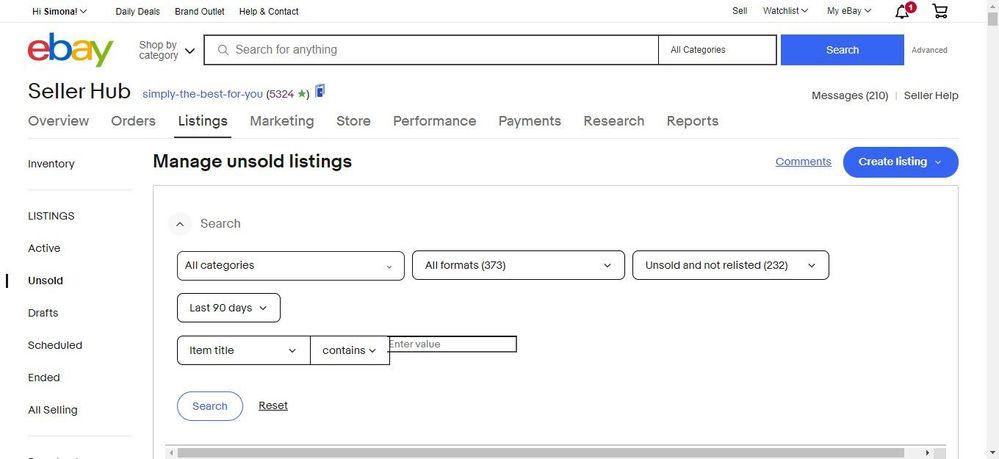
Seller Hub Unsold error on screen in Chrome
Are you guys seeing this weird, incorrectly sized box in Chrome on the SH>Unsold screen. It's been there for days now. Enough that it should have gotten fixed. Gone is the correctly sized box & we have this. Is everyone who uses Chrome seeing this?

simply-the-best-for-you
7 comments
simply-the-best-for-you
OPThank you @shipscript , reported & linked them to this thread for a list of platforms/browsers. It seems to be all based on the random sampling here.
shipscript
@simply-the-best-for-you
Perhaps it has been fixed since you mentioned this (since it is now Thursday evening when updates occur), as the view in my Firefox 113.0 and Edge 113.0.1774.35 all look fine on Win 10. And Safari 15.3 looks fine on MacOS 11.6.
Oops, I was looking at Active. The Unsolds do have a problem. Use the "comments" link on the page to report the field-display issue.
chapeau-noir
Yeah, it's been that way in Firefox, too. Still works, though looks janky.
simply-the-best-for-you
OPInteresting @ebooksdiva it's only been that way going on 4 days for me, in Chrome. Thanks.
@a_c_green Yeah, I know it's not the kind of fix that has priority, but jeez, how can they keep messing stuff up that works fine.
@shipscript Are you seeing this? Any clue as to what caused this? I know you can usually tell just by taking a peek. If so, can you please post before I report it? Thanks!
a_c_green
Around here, only showstoppers get fixed in days. This thing may be there a while.
Well, I'm seeing it; yes. I thought at first that it might be some kind of scaling error, but changing the display percentage from 100% to something larger or smaller just scaled the misplaced field along with everything else.
Unavailable member
Looks like the same I see in Safari on iPad and Edge on desktop/ laptop. It’s been like this for a good while.
wastingtime101
Ditto in Safari on laptop - on and off for a while. The field still functions, it's just the display formatting that got messed up.