Encountered a very unusual problem with my listings
I've moved recently and canceled my PMB (like a PO Box but private) and changed my address for everything on my account to my new one. I noticed my items still said the item location was my previous location, and went to bulk edit the item location under bulk edit, preferences, item location. It popped up with the right country, city and zip code. It looked good, so I applied then submitted. No mention of listing any of them them again at any point.
After, I get informed that 103 new listings have been added, 97 had issues, so 103 of my items were relisted all at once. The location was changed on them.
I contacted CS about the issue, and I get told they can't credit back those listings, and the agent tells me all my items say it's my new location listed, not old. But I'm seeing several when I check myself that still say the old location. The relisted items though are the new location.
I can't relist my entire store just to update the location, and I really don't know what to do to fix both my original problem, or the new problem, without spending a lot of extra time updating each listing manually and deleting all extra listed, since obviously something is wrong with the bulk edit feature. CS was very unhelpful, they kept repeating to me my listings have the right location when on my end some definitely do not and I voiced that I was seeing it when looking them up.
I also didn't appreciate how the agent told me not to worry about the 103 listings being charged because since I pay for a subscription, it wouldn't cost me anything. Only, I'm paying for those listings to be there if I need them, and now they're not an option for this month. Really not a good attitude to have about it at all.
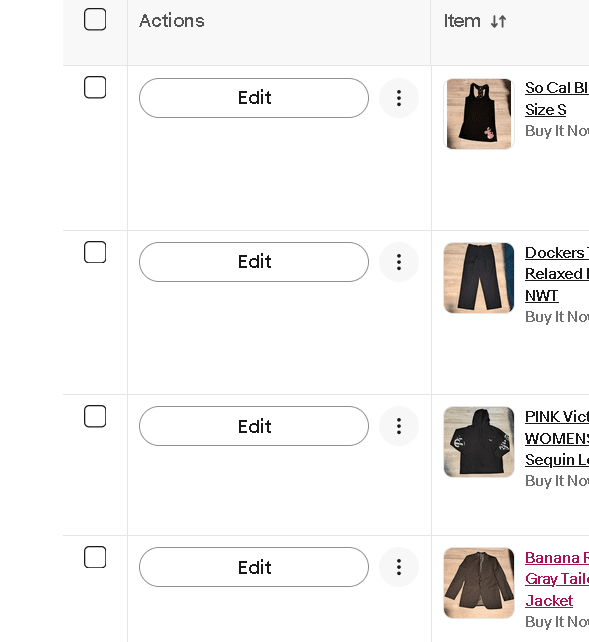
I also notice that now my listings have a big edit button next to them in my active listings section that was not there right before this happened. Does anyone know what might be going on or what I can do to fix this without spending my evening tonight combing through everything to edit or delete?

Unavailable member
The changes you made to your listings regarding location may take a bit to update, editing listings causes your listings to index which can take up to 24 hours.
That big edit and Promote buttons you see are the brainchild of an eBay techs idea . I find it annoying. So on my desktop I move that table over to hide all that nonsense.
linenandlaceltd
OPIt's actually this big edit button next to every item I have in my list that just popped up after I did the bulk edit 😅
Unavailable member
@linenandlaceltd
Yes, I know that is what I was referring to. Something new that eBay is fooling with. It’s nothing you did. On desktop you can move the column over to hide it like I did in my second image in the post above. But I’ll post a few more here.
linenandlaceltd
OPAhh okay, I see. It only let me try to update 200 of 424 I had, and 93 didn't work saying they weren't allowed to be duplicated. So I'm not even sure anything actually worked as it was supposed to, but I may wait and see what happens and manually do them all tomorrow and just delete the relists tonight.
I'll have to edit my table as well too to take up less space. Unfortunate now the sell similar and other options there have to have an extra step to access just to look prettier.