Automated feedback for sellers has never worked for me.
I only found out about this today. Apparently back in Sept., eBay started leaving automatic positive feedback for sellers when buyers do not leave feedback for successful transactions. Only about 1/5 of my sales ever result in feedback at all, so I was just lamenting the fact that I have so few feedbacks vs. the amount of sales I've made, and here I find out that eBay automatically leaves positives now! How do I activate this? None of the transactions where the buyer has not left feedback has resulted in automated feedback in the last 3 months.

hesadoll
5 comments
hesadoll
OPThank you guys for letting me know! But I still don't see that any feedback was left when I look at my Paid & Shipped page? So, if the buyer themselves don't leave feedback, it still doesn't show up as feedback left? See, this is why I was surprised this was even a thing. I didn't know about it, so didn't know I had to go looking for it. It's crazy to see how many more feedbacks eBay left vs. what customers are leaving!
44012
Yes, it doesn't show up as feedback left by the buyer if you are looking at the icons from the paid and shipped orders page. The icon is shaded.
I only know when I click the automatic feedback left as mamacassidy and ebooksdiva circled in red above on the feedback page.
a_c_green
Well, yeah, because that grayed-out icon on your Sold page is indicating whether the buyer left any feedback (yet). If or when he does, that icon will go black as usual.
As noted above, the buyer does not know whether eBay has left a default Positive in his place already, and if he leaves a comment, his rating and comment will supersede the one from eBay.
Unavailable member
There is nothing you need to activate.
You will receive automatic feedback from eBay at least 7 days after delivery .
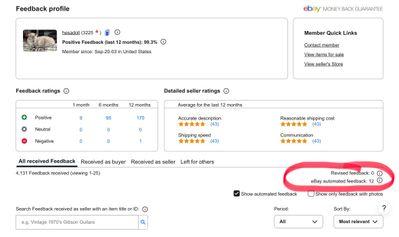
You have 12 automatic feedback so far.
Buyers can still leave their own feedback, it will replace the feedback left by eBay.
mamacassidy
Yes they have. You need to click on "show automated feedback" and then sort by most recent. You have quite a few.