combined shipments postage discount
i can not locate how to place a postage discount when buyers buy more than one item. it use to have a blank box
to put in a lower postage rate,but now
it doesnt!
but international has the option to place in a cost for second items!
help!
thanks

kashkows
6 comments
Unavailable member
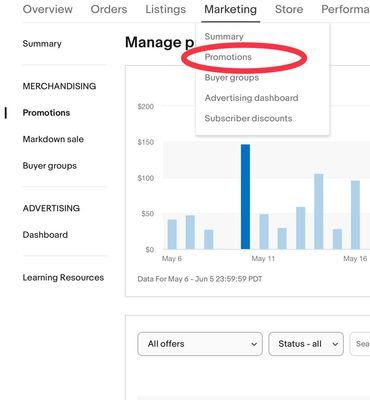
Go to your seller hub.
Click the Marketing Tab
Click promotion in marketing tab
Click create promotion , then click shipping discount.
kashkows
OPhi, thanks but it isnt a promotion, its everyday combined shipping discount if the buyer
buys 2 or more items, example, when i list international items the pop up comes
auto matically and i place the 2nd item postage in with a discount-
buy domestic postage doesnt have the pop up anymore for me to put
the discounted price in, the pop up was automaticlly until ebay changed
something---
promos i understrand but this isnt a promo-
help!
thanks
ry
shipscript
@ebooksdiva
FYI: I don't have an active marketing tab because I don't have a store.
12345jamesstamps
I just click on the item or items they bought and click on refund and it does ask what it is for is for "a shipping discount". Kind of get a tiny refund as the seller also.
kashkows
OPthanks but thats AFTER they buy items,for refunds, that isnt my problem,
i went to the link below to set up combined shippine discounts but there is a problem...
https://www.ebay.com/ship/rt?client=4&shippingType=ITEM_QUANTITY&locality=DOMESTIC&shippingDisplay=DEFAULT&packageType=SMALL_PACKAGE&basePath=https%3A%2F%2Fwww.ebay.com%2Fship%2Fprf
.
the first box doesnt have an option in the drop down menu, all other
boxes i can fill out, it wont let me save what i ask for starting with the first box,
must be a program problem because the first drop down box has nothing to
chose from....
shipscript
@kashkows
I see a similar problem because I have not created a rate table.
That droplist at the top left contains the names of your previously created profiles.
So, first, fill in all of the other data, skipping the dropdown at the top left.
Give the profile a name.
Save.
Next time, you will see your new profile in the top left droplist.
Then you can go back and edit a profile by selecting its name from the top left droplist.