Why are all of my images so small?
All of my images have an extra amount of padding or gray space around them when I look at them in my store. The product images I uploaded on eBay do not have this extra space! Why is eBay adding extra padding around the product? It's making the item hard to see details. My items look like they are floating in the far distance! See screenshot below.
Is anyone else seeing this on their listings? Does anyone know if eBay is aware of this issue? Thanks in advance for any insight you can provide.
Best -
threetabbycats
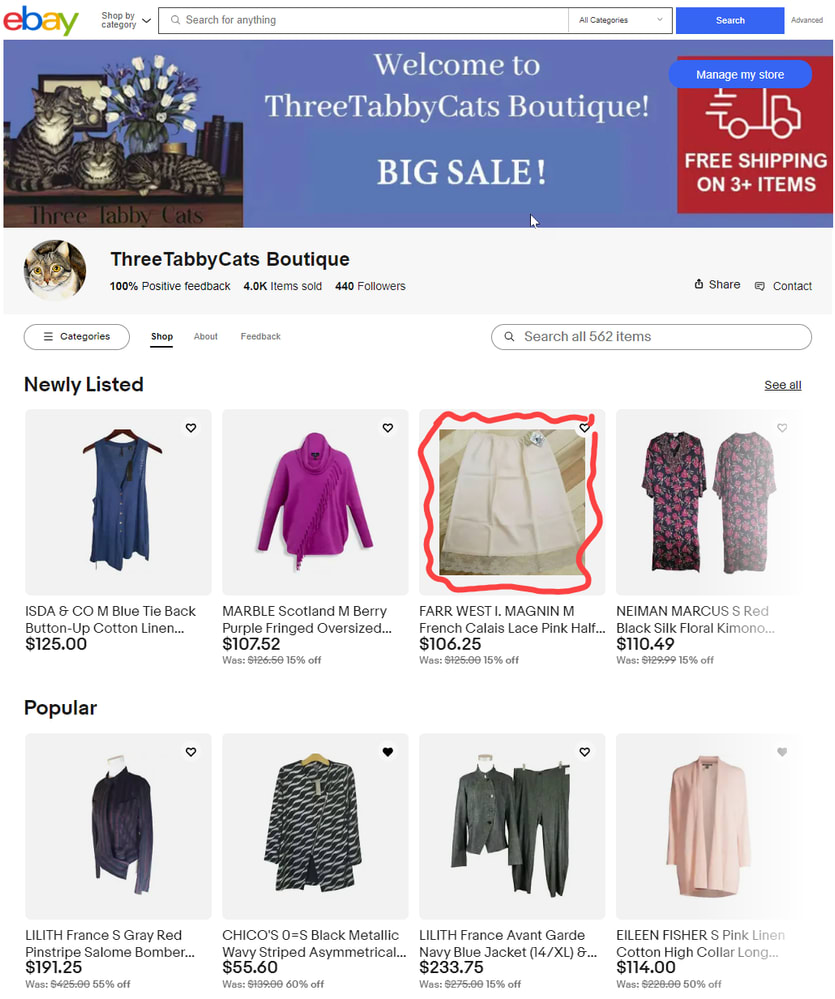

threetabbycats
44 comments
animestickers
So.. Seems like this is still an issue and I found a fix 😎
Since eBay is notorious for just continuously building on itself without getting rid of old coding...
1. Go to your search results and click on the little drop-down menu, then click on Customize
2. Ignore all the settings up top and click on Restore defaults
This will magically turn all the images to large sizes with no grey cushioning
3. Re-select whether you want your results to show in List or Thumbnail format (if it changed).
wastingtime101
Appreciate the suggestion (nearly identical suggestion was posted upthread a few posts, but it's not working for many of us. Hopefully it will help some who find this discussion!
animestickers
The nearly identical suggestion was to "select the largest size of the thumbnails"
That didn't work for me either. Restoring default settings did though.
wastingtime101
Unfortunately not for me. As soon as I switched back to gallery view after restoring defaults (and saving), the gray border was there.
threetabbycats
OPThis is great, BUT, what about all the protentional buyers who will still see the tiny images! This still needs a fix for THAT!
little.luxe.armoire
Well, I learned something I didn't know before! I was poking around in old message threads and learned that in your search results, if you go to the upper corner and click the pulldown menu by the lines...:
...you can change the thumbnail size!
I think the storefront pictures were a completely separate issue that seems to have started/been resolved with no changes on our part, but I had no idea you could change the thumbnail size in search results manually. Hope this helps others.
threetabbycats
OPYep, but at least for me, even when I select the largest size, the images are still small.
little.luxe.armoire
Darn...hoped that would solve the issue like it did for me...
wastingtime101
Nope, changing thumbnail size didn't help, but thanks for the suggestion. It was worth trying.
wastingtime101
To demonstrate, my default thumbnail size has always been large. This screenshot shows the difference between small-medium-large thumbnails. You can see the large setting isn't even close to filling out the space. This was taken with Safari browser. Tagging @kyle@ebay in case this helps his interactions with the product team.
wastingtime101
Images are back to normal on store home front, but sadly I'm now seeing the gigantic space around them in gallery search view like some others posted screenshots of above. Pictures are shrunk down to nothing.
Anybody else seeing these changes?
@threetabbycats @shipscript @little.luxe.armoire @cottage-ware @selsa84
Can we get an official word on this @kyle@ebay ?
little.luxe.armoire
Hooray for the storefront being back to normal!
But yes @wastingtime101 , when I do a search using the storefront search bar, it returns the same tiny images with the huge gray space. If I use the categories sidebar to narrow down, those images look normal.
For as long as I can recall, any searches I do on the main eBay site always return the small images/large gray box. Doesn't seem quite as small as the storefronts were looking, but pretty close. It looks junky. I never did understand why it was designed that way. Just accepted it, I guess, until it affected me directly...
selsa84
Same, store normal search images are small
mcdougle4248
Yes, I am seeing what you describe.
threetabbycats
OPSame here. Storefront is back to normal, but the gallery view still looks horrible.
amazing-games-electronics-n-clothes
Hi! I'm in Canada on eBay.ca and have the same problem, I hate it and if I look in other stores (USA/Canada) I see the same reduced images with a gray bar around them. I have the same problem if I go to eBay.com. I called eBay and they told me my store was fine and they hadn't seen the reduced images. I never changed anything (zoom, etc.) until the problem occurred 3 or 4 weeks ago. I've tried several things and nothing has changed yet. I will call eBay again tomorrow because it is very ugly, it is very bad for the business and the customer experience. This is unacceptable, the spaces must be full.
I hope the problem will be resolved soon...
comicchixs
I really don't like the small pics. It makes the storefront look like there is a technical problem having the large category images and the tiny product images. I wonder if they are doing this to try to save money on bandwidth...
selsa84
Featured items aren't looking so featured now. Horrible
threetabbycats
OPHi would any of you tagged below be able to please get the technical and or design team to look at this? Nobody likes these small images on the storefront or in gallery view. It looks terrible.
@seller_update@ebay
@kyle@ebay
elizabeth@ebay
Thanks in advance for any help you can provide. This is really ugly!
selsa84
Same here, the display in my store for featured items is much smaller now. But featured categories is huge.
cbacal
If this is intentional & not a tech glitch as several of you are stating, this is absolutely idiotic.
I wonder if anyone that makes these decisions has ever sold anything or run a business.
It doesnt matter what the reasoning may be, if someone goes online to buy something and they look at listings that are 1/4 their original size, then see that there are 6-8 lines "similar listings" that are splattered all over the sellers' listing... (mostly totally unrelated items)
THAT DOESNT SCREAM CONFIDENCE - IT SCREAMS: Go look somewhere else.
This is freakin typical ebay, last year they redesigned the Store Front for storeowners and it was a great look!
Much more professional & effective, and between these 2 mindblowing moves they've totally undone that effective move.
In addition, now you cant see promotions on the listings... only if you CLICK on the listing. I know some are showing the "sale" discount- but it doesnt show "promotions"
Whatever this new page design is supposed to look like I dont NOT have any confidence.
Why? Well after selling for almost 9 years I usually average 25-30 sales per weekend during holiday shopping...
This past weekend I had ONE sale- even with almost 1000 items for sale
threetabbycats
OPHi would any of you tagged below be able to please get the technical and or design team to look at this? Nobody likes these small images on the storefront or in gallery view. It looks terrible.
kyle@ebay
elizabeth@ebay
seller_update@ebay
Thanks!
threetabbycats
OPResending because I didn't' link the tags in my earlier message.
Hi would any of you tagged below be able to please get the technical and or design team to look at this? Nobody likes these small images on the storefront or in gallery view. It looks terrible.
@seller_update@ebay
@kyle@ebay
elizabeth@ebay
Thanks in advance for any help you can provide. This is really ugly!
Thanks!
kyle@ebay
Hey @threetabbycats and @wastingtime101 thanks for bringing this to our attention! I see from later posts that the storefront is back to normal, so that's good. But we still went ahead and reported this for the gallery view. We'll be sure to pass along any updates we receive!
cottage-ware
Same issue with all of my listing pics being displayed on my store page as very tiny images surrounded by gray. It started roughly 7-10 days ago and I believe it's technical issue.
little.luxe.armoire
That's exactly what my storefront looks like. I tried to find @shipscript explanation referenced above, but I couldn't see it anywhere.
Increasing/decreasing the page zoom doesn't make it look any better. The images stay relatively proportional, and the larger you make the print, the larger the pictures become. When it reaches the point where you could actually make out some details, it's too blurry to see much. Seems hard to believe that eBay wants it to look like this.
@community_team Is it possible to get confirmation as to whether this is technical issue vs. an actual change to storefront design?
threetabbycats
OPYes, it looks awful! Why would eBay do this intentionally? It is a terrible design!
wastingtime101
We all dislike it. It's by design and has to do with the image adjusting as page zoom increases/decreases.
@shipscript had a great explanation but I can't find the post at the moment.
little.luxe.armoire
Gosh, that's too bad; it doesn't look professional at all! No actual online store has images that small. It's giving me "internet in the early 2000s" vibes. Thanks for the information.
shipscript
I found the thread with the picture issue. Unfortunately, it was a question that had sidetracked from the original topic, making it difficult to locate.
https://community.ebay.com/t5/Report-eBay-Technical-Issues/Unable-to-see-full-resolution-of-my-images/m-p/33698371#M110847
"...when I click "View all" in the upper right, eBay goes to a view that makes my photos look very small with lots of excess white space around the product. "
This is a better thread for my response:
___________________
Search on the left, below, is in list view.
Search on the right, below, is in gallery view.
Gallery view does have extra padding in the picture holder, but the underlying image is the same size in both views (lower left).
However, if you change the width of your browser by dragging the edges inward, notice how that extra padding shrinks? eBay is employing a web technique to flex the content. So, the image holders shrink smoothly, as the number of tiles across decrease from 4 to 3 to 2, while the image remains the same size most of the way.
This is by design and is not a technical issue.
However, one could make the argument that the design itself is flawed. eBay could flex the images within the cells by providing a photo that matches the largest cell, and then shrinking the image as the cell gets smaller, rather than holding the image at one size and flexing only the outer cell. However, the page layout would be more complex, and perhaps they have found browser scenarios that render differently with that more complex coding.
wastingtime101
Thanks @shipscript . Yesterday I found the thread where I thought it was posted, but it turned out to be a thread on the same topic but not the one with your info about the content flexing.
The reason more people are noticing it now is because eBay recently made things even worse. We used to see the extraneous background exclusively in search gallery view, but not on store home fronts. Within the past week eBay changed store home fronts to that same programming with extra space around our images. It looks terrible.
little.luxe.armoire
Thank you for going to the effort of finding that post!
So I'm going to attach two screenshots here to make sure that I'm seeing what you're seeing - one of my normal four-tile view, and then what it looks like when I narrow the browser window to get only three tiles:
It doesn't really seem to me like the padding around the images is changing. Is this working how it is supposed to? The pictures themselves don't appear to increase in size, either.
wastingtime101
I wonder why the screenshots posted by @little.luxe.armoire and @cottage-ware show such massive borders around the images. What I'm seeing is more in line with the screenshots posted by @threetabbycats and @shipscript .
Maybe it's your screen resolutions or browser zoom?
One of the frustrating things about this is it's designed for the image to fit a smaller cell and as the window expands the only thing that changes is the width of the border around the image. More people are likely to expand the width of their browser window than shrink it down to nothing with only 2 images across. As I expand the width of my browser window to full screen, the images/borders look the same as at my "normal" browser window size. Only when I shrink the width of the window to something unusually narrow does the border around the images start to disappear.
As Ship mentioned, it would be better if the images filled the largest cell and flexed to shrink.
little.luxe.armoire
It's definitely a headscratcher.
I've tried different browsers (Safari and Chrome) and both look exactly the same. I've cleared cookies, cache, all that. If I browser-zoom in far enough, eventually the gray space reduces a bit but then the pictures are blurry. I'll look into the screen resolution.
Now that I'm thinking and typing here, one thing that coincides with the beginning of the issue - which was 1-2 weeks ago - is that I updated my MacBook to the latest OS in that same time frame. I haven't noticed a difference on any other website, but it's another thing I'll check out.
wastingtime101
I recently upgraded to Sonoma and I'm not having the issue on up-to-date Safari or Firefox. I mean I am seeing the extra border posted by the OP, but I'm not seeing the really thick border that you are @little.luxe.armoire . My current resolution is set at default 1680 x 1050. I've tried different browser zooms from 100% to 85% and it looks the same in all. the only difference is if I shrink the width of my browser window.
little.luxe.armoire
I tried changing to all the different screen resolutions but to no avail. Also disabled any running extensions and unfortunately that wasn't it. It may remain a mystery until enough people are experiencing the same thing.
And I'm seeing everyone else's stores just like mine - with a ton of gray space around the images and hard to see them. @selsa84 - I just looked at yours, and you're right...your featured category at the top is so big that I can't imagine that it's supposed to be that way!
cottage-ware
Hi, Shipscript! I read your reply and the tech issue pages that you linked to, thank you for that!
I see what you mean! My store page using my desktop looks ridiculous with the pics displayed so small amidst the large gray frame, especially on the featured items. But if I bring the browser page way in, not just a bit but almost to half the size, the gray frames nearly disappear but the pictures are still very small.
Its hard to imagine that their intent is to have items featured on a store page display like they are now.
I'm hoping that this is a tech issue and not permanent. (?)
kenk14519
Same Here. I called Ebay . They said its intentional and part of there new updates.
cbacal
same issue
little.luxe.armoire
Came here to ask maybe the same thing? Within the past week, all of my storefront images pictures went from normal size to thumbnail size. It doesn't look great!
aparkers
Same issue.
threetabbycats
OPCompare the two photos below. The photo on the right is what my photos should look like filling the whole photo square. The photo on the right is how my photos look on eBay's pages. What is going on???