Filter out trading cards?? Negative keywords don't work!
For the past few days I've been trying to find a reliable way to filter trading cards OUT of my search results or exclude this product category from my searches. I'm trying to basically find various items and products pertaining to the Pokemon franchise that are NOT trading cards sorting by ending soonest. I don't want to pigeonhole my search into one specific category as I'd like to find anything and everything Pokemon that is simply NOT a trading card. However even when specifically using the search filters "-tcg -card -holo -cards", I still get results that literally include the word "card" or "cards" in the title! Screenshots attached.
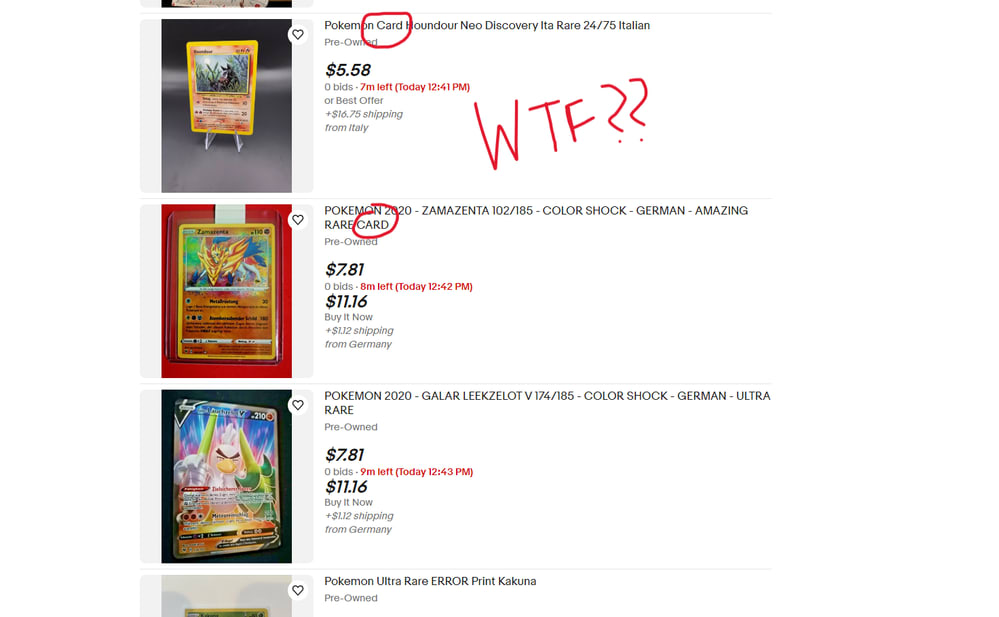
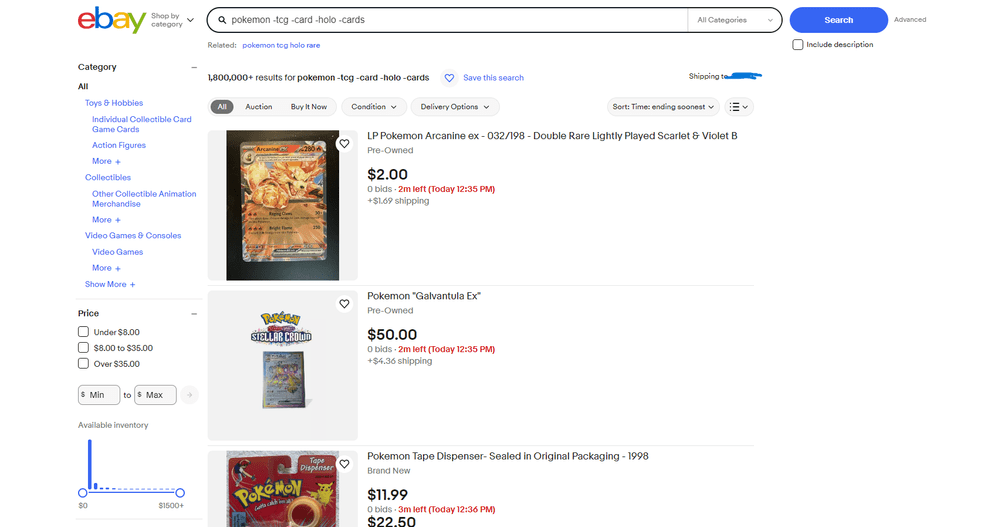
BONUS: If I adjust my search and add "-vstar" to try and filter out one of the latest pokemon tcg sets, for some reason I get 0 results despite searching in all categories (and the cherry on top is the suggested results ALL being trading cards). There are literally thousands upon thousands of non-trading card items relating to pokemon on eBay, this makes no sense to me.
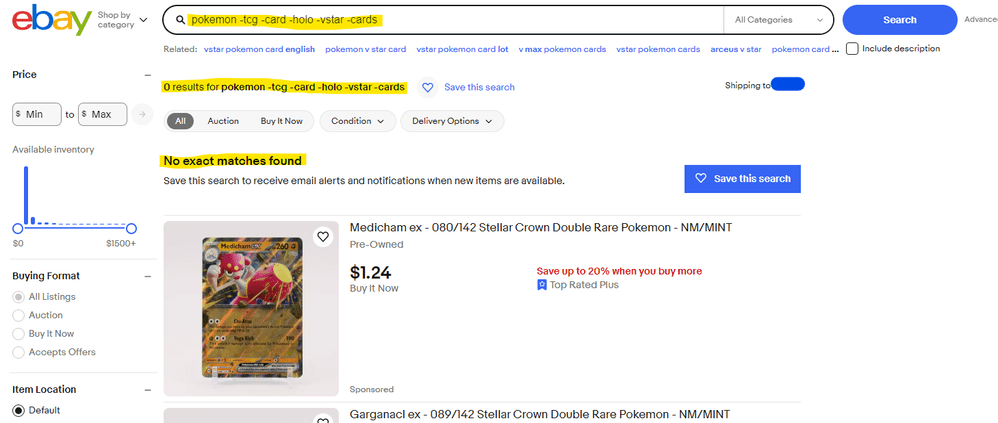
This is incredibly frustrating and it really sucks to sift through pages of single trading cards to try and find unique items. Any help would be appreciated!!

mudshark61369
@officialcatpuccino,
"I'm trying to basically find various items and products pertaining to the Pokemon franchise that are NOT trading cards sorting by ending soonest".
Your screen shots show searches Pokemon - TGC - Card - Vstar - cards
If those were ebay prefills just typing past them will let you get more specific.
You can also do Advanced searches and after writing a title select Exact words Any order or Exact words exact order.
Rather than trying to prevent a keyword (card) from affecting your search results, why not try adding specific words to your search for Pokemon items?
Examples:
Pokemon deck tin.
Pokemon binder.
" " Cereal box
" " Figure
" " Plush or Plush figure
" " Pokedolls
" " Badge(s)
" " Blister pack
" " Marble(s)
" " Eeveelutions Rubik’s Cube:
.... Ad Infinitum
You can save those searches to make it quicker to go back to them.
eburtonlab
I don't want to pigeonhole my search into one specific category as I'd like to find anything and everything Pokemon that is simply NOT a trading card.
Despite this, you may still be better off creating multiple targeted searches of specific categories rather than trying to filter out an entire category of millions of popular listings using keyword exclusions. Even if you succeed at filtering 99% of the cards, cards that are left will still tend to dominate your search results since there are just so many of them.
Some of your issues with items not being excluded may be foreign listings with titles that are not originally in English where you are trying to filter out English keywords that are not in the original listings at all, even though eBay displays a translation of the listing into English in your results.
If you are specifically looking for auctions that are ending shortly, limit your results to auctions. If you are searching buy-it-now listings, sorting by "Ending soonest" will put auction listings at the top of your results anyway.
Building on what @watrwest has suggested:
https://www.ebay.com/sch/i.html?_nkw=pokemon+-%28card%2Ccards%2Ctcg%2Cholo%2Cvstar%2Ctrading.card%2Ctrading.cards%2Cags%2Cbgs%2Cpack%2Cpsa%2Cccg%29+&_sacat=0&LH_TitleDesc=1&LH_Auction=1&_odkw=pokemon+-%28card%2Ccards%2Ctcg%2Cholo%2Cvstar%2Ctrading.card%2Ctrading.cards%2Cags%2Cbgs%2Cpack%2Cpsa%2Cccg%29+-ccg.individual.cards+-individual.collectible.card.game.cards&_osacat=0&_sop=1&_ipg=200
watrwest
This url cuts results from nearly 6 million to "only" 1.2 million.
This is an absurd number of results ... but it may be a start.
https://www.ebay.com/sch/i.html?_pgn=1&_ipg=200&_sop=1&LH_TitleDesc=1&_nkw=POKEMON-(CARD,CARDS,TCG,HOLO,VSTAR,)
Breakdown....
pgn is current results page number,
this will change as you page through the results
jpg # of items displayed per Results page valid options= 25 50 100 200
sop is SORT ORDER PREFERENCE 1=closing soonest
fyi... 10= newly listed ... you are currently missing any underpriced BINs
TitleDesc =0 search in title only =1 search in title & description for both terms & filters
nkw is SEARCHTERM-(FILTER01,FILTER02,etc,etc,etc,)
fyi... I think there is a 100 character maximum for the term + filter combo list.
Remember, if the seller doesn't actually mention
card or cards or any of your filter words
in their listing there's nothing you can do about it.
Except create a FILTERED SELLERS list of dealers
whose stuff you just don't ever want to see in your results.
Add this to the end of the url above (note the commas between IDs)...
&_saslop=2&_sasl=SELLER01,SELLER02,
good luck...