"There is no such thing as foolproof, because fools are so darned ingenious" (unknown)3115View listings
@bqbguitar,
As @wastingtime101 wrote, general category searches do not have several of the filters that specific item searches have. Even if you do a specific item search and click on U.S. only, China based seller's who registered in the U.S. will have their items displayed. So you need to check listings carefully to try and avoid them.
There may be indications on listing pages, or on a feedback profile page that can tell you if a seller is actually a U.S. based one or not. Below is a list of things I use to weed out foreign sellers. If you search using Price: Lowest or Best Match you are very likely to see items from China based sellers first. I search using Time: ending soonest or Newly listed.
On Listing pages:
Items priced below brand named prices.
An item location address that does not give a city and state Ex: USA / United States, New Jersey / USA
The use of U.S. flag symbols and several mentions of being a U.S. seller.
Seller's username sometimes.
Selling items listed by many other sellers, often using the same stock photos.
High volume seller with a feedback percentage below 98.6%
Item descriptions that have wording in them that doesn't seem like it was written by a person whose first language is English.
Item titles giving a brand name, and photos showing a brand name label, but in the Item Specifics it says Brand: Unknown or no brand given.
Items for sale with no name or an unrecognizable Brand Name.
The use of metric and standard measurements.
Photos with Asian models in them.
On a Feedback profile page:
The seller's country of registry, sometimes.
High volume seller registered between 2012 and now.
All or most feedback is for Private listings.
Hundreds of neutral and negative feedback. Some may still have a percentage over 99%
Neutral and Negative feedback saying items came from China. That took a long time to arrive. Missing items from multiple quantity orders. Cancelled purchases. Poor communications. Clothing smaller in size than normal. Many mentions of poor quality items. (click on the numbers of neutral and negative feedback received, to read only those comments).
Responses to negative feedback written by someone whose first language does not appear to be English.
It may take a little time to use the above lists, but after a while it becomes second nature, and in the long run can save time and possibly money.
Since I created the lists, getting to a sellers feedback profile page has become harder than just clicking on their feedback number. Now you have to:
Scroll way down a listing page until you see the seller's username in a large font. Under it will be a few comments, and under that a See All Feedback button. Click on it. On the page that opens you will see the following line above some comments.
Click on the switch back to classic view. That will show you the box with the number's of neutral and negative feedback a seller has received, which can be clicked on to read only those comments.
That is annoying. If your looking for effects, maybe type in pedal (search bar) and sort down from there. (if you don't already know) When i sort categories, i typically have models, brands that i start with and sort down from there.
that aint gonna work. many listings without that word. ebay needs to get with the program. alotta buyers including me dont wanna bid on things from overseas
that aint gonna work. many listings without that word. ebay needs to get with the program. alotta buyers including me dont wanna bid on things from overseas
I purchase pedals in the US as well and do not have any issues. If you want a pedal or effect, you can put that term in the search engine, and it will pull up everything. At that point you can filter the region (US Only), the category and subcategories. Obviously, you can tweak your search term to include other specifics like distortion, effect, chorus, brand (Ibanez), model (TS808) for example. Yes, eBay can do better but you can find what you're searching for.
that aint gonna work. many listings without that word.
If you do not see the filter options you need when browsing a category, try searching using the category name as your search keyword(s). It may not always work for categories with nonstandard naming involving ampersands, but it works for most other categories.
Shows me "220,000+ results for guitar effects pedals" -- note that this number is often rounded down to two significant digits. For smaller categories you may be able to verify if you are seeing the same results or not.
Looking closely at the original category link, I see a link for "All filters" at the top, which, if used, allows access to the Item-location filter:
FYI @eburtonlab - not everybody has the All Filters option on the category page. eBay announced at eBay Open that they're working on a brand new search which will be rolling out next year.
I expect it's going to be a lot like what they did to seller hub, hiding everything behind a handful of buttons with the filters under countless nested layers - as if one was on a mobile app. Personally I'm not a fan of a mobile experience on the web; it's far too inefficient even if it looks nice visually.
In the meantime eBay is, as usual, rolling out specific elements to specific test groups. That's why you can see all filters on that page, but I can't.
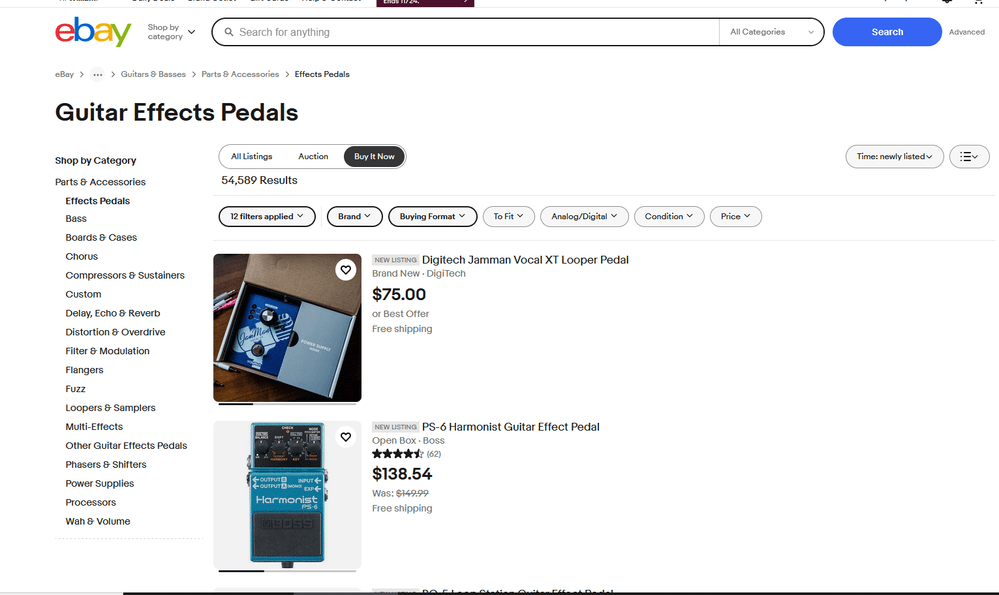
You're not going to see the filters you're looking for until you enter search terms.
With general category browsing you're limited to the filters at the top of the page, as opposed to direct searching where you get the left panel filters.

mudshark61369
@bqbguitar,
As @wastingtime101 wrote, general category searches do not have several of the filters that specific item searches have. Even if you do a specific item search and click on U.S. only, China based seller's who registered in the U.S. will have their items displayed. So you need to check listings carefully to try and avoid them.
There may be indications on listing pages, or on a feedback profile page that can tell you if a seller is actually a U.S. based one or not. Below is a list of things I use to weed out foreign sellers. If you search using Price: Lowest or Best Match you are very likely to see items from China based sellers first. I search using Time: ending soonest or Newly listed.
On Listing pages:
On a Feedback profile page:
It may take a little time to use the above lists, but after a while it becomes second nature, and in the long run can save time and possibly money.
Since I created the lists, getting to a sellers feedback profile page has become harder than just clicking on their feedback number. Now you have to:
Scroll way down a listing page until you see the seller's username in a large font. Under it will be a few comments, and under that a See All Feedback button. Click on it. On the page that opens you will see the following line above some comments.
Click on the switch back to classic view. That will show you the box with the number's of neutral and negative feedback a seller has received, which can be clicked on to read only those comments.
bqbguitar
OPi want US only items
chevymontecarlo88
That is annoying. If your looking for effects, maybe type in pedal (search bar) and sort down from there. (if you don't already know) When i sort categories, i typically have models, brands that i start with and sort down from there.
bqbguitar
OPthat aint gonna work. many listings without that word. ebay needs to get with the program. alotta buyers including me dont wanna bid on things from overseas
chevymontecarlo88
I purchase pedals in the US as well and do not have any issues. If you want a pedal or effect, you can put that term in the search engine, and it will pull up everything. At that point you can filter the region (US Only), the category and subcategories. Obviously, you can tweak your search term to include other specifics like distortion, effect, chorus, brand (Ibanez), model (TS808) for example. Yes, eBay can do better but you can find what you're searching for.
eburtonlab
that aint gonna work. many listings without that word.
If you do not see the filter options you need when browsing a category, try searching using the category name as your search keyword(s). It may not always work for categories with nonstandard naming involving ampersands, but it works for most other categories.
The category without filter options:
https://www.ebay.com/b/Guitar-Effects-Pedals/181222/bn_7439940
Shows me "221,389 Results".
Searching using the category name as search keywords and limiting to that category if necessary:
https://www.ebay.com/sch/i.html?_nkw=guitar+effects+pedals&_sacat=0&_sop=1
Shows me "220,000+ results for guitar effects pedals" -- note that this number is often rounded down to two significant digits. For smaller categories you may be able to verify if you are seeing the same results or not.
And finally, the search using the US-only filter:
https://www.ebay.com/sch/i.html?_nkw=guitar+effects+pedals&_sacat=0&_sop=1&rt=nc&LH_PrefLoc=1
Shows me 81,000+ results for US-only.
Looking closely at the original category link, I see a link for "All filters" at the top, which, if used, allows access to the Item-location filter:
https://www.ebay.com/b/Guitar-Effects-Pedals/181222/bn_7439940&LH_PrefLoc=1?mag=1&_fsrp=0&rt=nc&_sacat=181222&LH_PrefLoc=1
Shows me 81,945 Results in that category for US-only.
wastingtime101
FYI @eburtonlab - not everybody has the All Filters option on the category page. eBay announced at eBay Open that they're working on a brand new search which will be rolling out next year.
I expect it's going to be a lot like what they did to seller hub, hiding everything behind a handful of buttons with the filters under countless nested layers - as if one was on a mobile app. Personally I'm not a fan of a mobile experience on the web; it's far too inefficient even if it looks nice visually.
In the meantime eBay is, as usual, rolling out specific elements to specific test groups. That's why you can see all filters on that page, but I can't.
wastingtime101
You're not going to see the filters you're looking for until you enter search terms.
With general category browsing you're limited to the filters at the top of the page, as opposed to direct searching where you get the left panel filters.
bqbguitar
OPwell that sucks. i'm not looking for anything specific. i wanna see all items in the category
chevymontecarlo88
@bqbguitar
What options are missing that you need in searching?
albertabrightalberta
I did the same keyword search:
wastingtime101
What you're looking at is very different @albertabrightalberta . You're entering search terms.
@bqbguitar is browsing by category, they are not doing a specific search. My post above explains the difference in filters.
The original poster is looking at this page:
https://www.ebay.com/b/Guitar-Effects-Pedals/181222/bn_7439940
albertabrightalberta
Got it! Thanks for pointing out the difference, @wastingtime101
albertabrightalberta
@bqbguitar
You aren't scrolling down far enough on the left hand side.
bqbguitar
OPall the options available are in the screenshot. scrolling down there's nothing there. missing alotta options! This happens to me constantly