Printing Ebay shipping labels on #10 Envelopes
Is there a way to print the shipping labels that Ebay generates on a #10 envelope??
Since I do not have the equipment for the self-stick ones, I have to tape them to them envelopes which I hate doing.
Thank You for any help

bear1982cam
8 comments
shipscript
@bear1982cam
It may be possible to feed your envelopes through a printer (if it has an envelope feed), which I have done in the past with various printers. But eBay's label isn't oriented the right way for any of my printers, so I would have to print as an image and then manipulate the image. And I could still experience a printer misfeed or jam. Simply too much work.
SOLUTION: I bought a can of spray glue. It works great for all of my plain paper shipping labels, including the ones I stick to #10 envelopes and bubble bags prior to inserting the contents. I spray the label within a cardboard box to contain any overspray and immediately attach to the package. A can of spray glue is expensive, but it lasts a long time. Shake before each use and tilt upside down for final shot (to clear the nozzle).
I don't add any tape to the envelopes, as they must travel through high-speed sorting equipment. However, when I glue labels to packages, I will also clear-tape over the address portion and the tracking number. The post office does not want tape over their barcodes because the glare can foul the scanners.
I was at my PO the other day, and the clerk had a whole stack of boxes on the floor. He had set them aside because the labels were damaged, so he was going to have to manually enter the delivery "scan" on each of them. I told him about my method that preserved the readable tracking number, and he loved that idea, but was pretty adamant about not taping over the barcode.
bear1982cam
OPThanks for the reply. I print envelopes all the time through my printer. I have no idea why I can't do this with there labels, well I do know as they want to sell me them. If I could find a way to rotate and print them, but I have not. Thanks again !!
rfmtm
MentorWhat specific type postage are you trying to print on an envelope?
shipscript
@bear1982cam
This is an ESUS label and its orientation when printing.
The leading edge is the return address, but when printing a #10 envelope, we would like the leading edge to be the postage so that it conforms to postal requirements. So, to print an end-feed #10 envelope, it would need to be rotated 180°. Or, if printed as-is, the printer must be set up to add a few inches of margin to the top of the image to push the label closer to the trailing edge of the envelope.
There can also be a side margin if your letter feed is in the middle of tray, rather than at the left or right edge of the tray (I've had both types).
 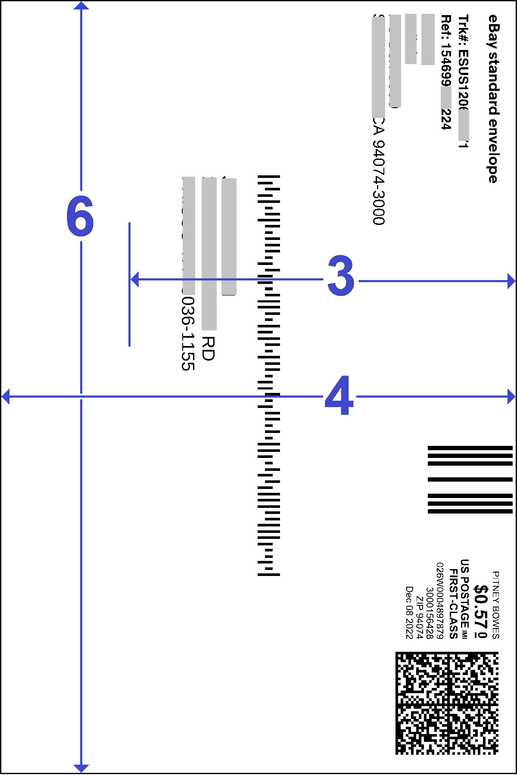 Shipping - eBay standard envelope label dimensioned
On the label screen, choose the 4x6 label size, and also choose to create a PDF file or a PNG image. If you can set the print margin when printing a PDF, then leave it at that. If you need to manipulate the label, then generate a PNG image, and use your image software to move the image or to print with a larger leading margin.
rfmtm
MentorIf we are assuming that OP is printing an ebay Standard Envelope, as far as I know it still temporarily defaults to the half sheet label format, even if you select one of the other formats, as that output does not support label printers. However, it is still possible with Adobe to make it fit on the envelope.
bear1982cam
OP.60 Cent postage on a # 10 envelope end feed into my HP printer. I can rotate it, but then it goes right back to the original. Like they have something built into it so you can't do it. It should be very simple to do this.
rfmtm
MentorDoes the preview look correct? If so, check that your printer orientation setting isn't overriding it.
rfmtm
MentorEbay does not print postage for letter rate only First Class Parcel. Or are you talking about the ebay Standard Envelope? Or an envelope you are going to put stamps on and just need an address label for?